Account and SMS · 27/30
SMS from your own phone
BookPyng does not send SMS from the server: they are sent by an Android app installed on the business’s phone. That way reminders go out on your phone plan, with no per-message cost from us.
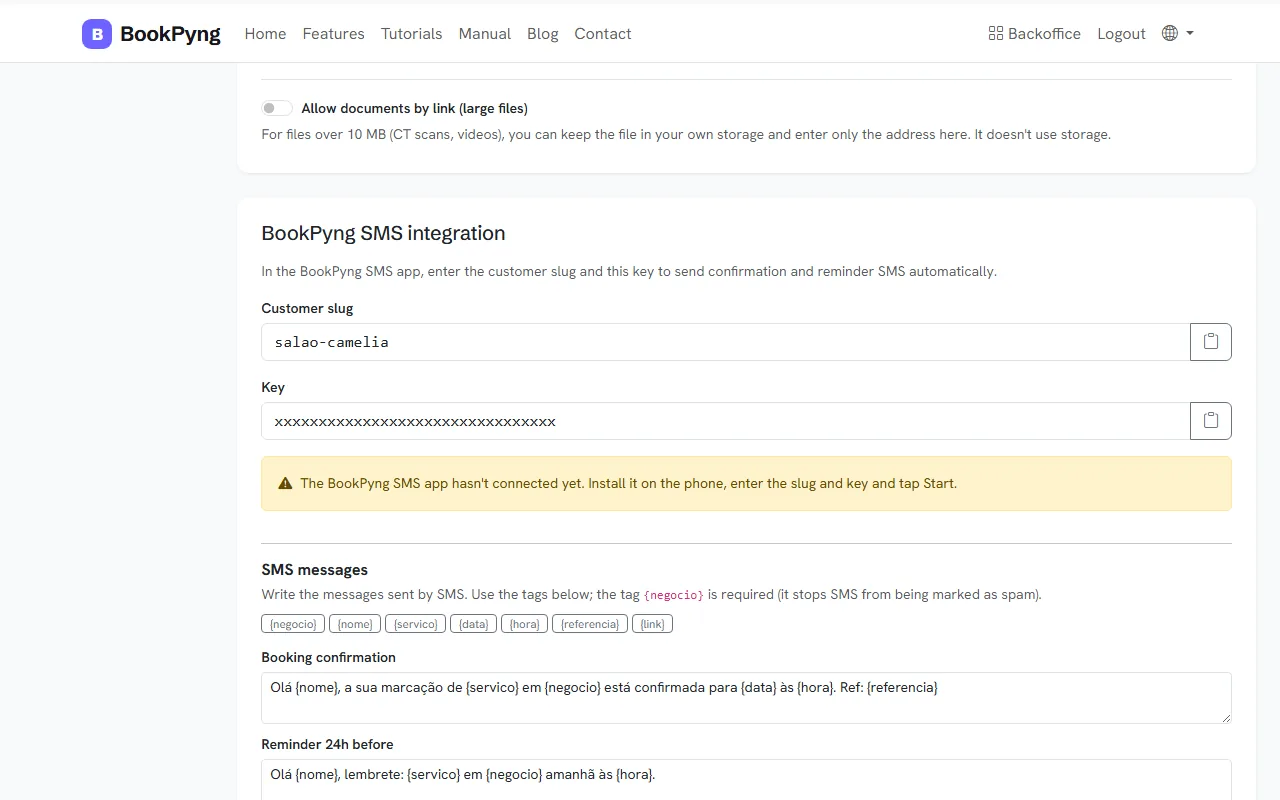
Step by step
- Download the BookPyng (Android) app from Plan → “Download BookPyng app (Android)”. If the button does not appear, ask us for the install link.
- The app is an APK and is not on the Play Store (because it sends SMS): when installing, allow installation from unknown sources.
- In the app, enter the Server URL, the Customer slug and the Key. These values appear in Plan (“Set up the BookPyng app”) and in Settings (“BookPyng SMS integration”), with a button to copy them.
- Press “Start” in the app. In Settings you will see “App active on the phone — listening for SMS requests”.
- Under SMS messages, write the texts for confirmation, 24 h reminder, 1 h reminder, time proposal and attendance confirmation request. The
{negocio}tag is mandatory (it keeps them from being flagged as spam). - In View SMS log you see the SMS sent.
Heads up
If the app stops connecting, you will see “The app has not connected for…” in Settings. Open it on the phone and press “Start”; while it is stopped, SMS stay unsent.
Tips
- Keep the business phone on and online, with the app open.
Ready to have your own app? Create an account and get 14 days with everything unlocked.
Create my app